
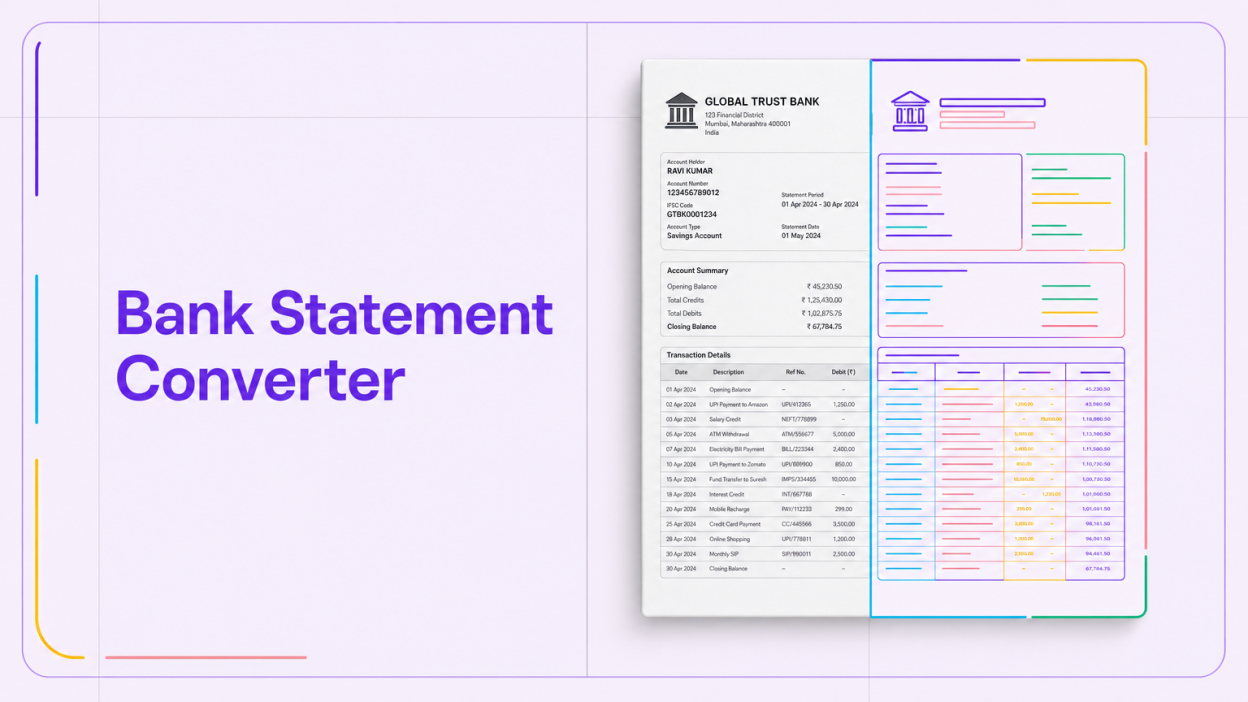
A bank statement converter turns a PDF statement into rows and columns (date, narration, debit, credit, balance) that open in Excel or a CSV. Digital PDFs convert by reading the embedded text layer; scanned ones need OCR. For personal use, that is enough. Lenders and CAs also need reconciliation, tamper checks and categorisation.
Free upload boxes promising an Excel file in seconds work tolerably on a clean, digital PDF. Fewer handle a scanned statement, a 40-page current account export, or a password-locked file.
The harder question is what happens to the statement after upload. It carries a name, account number, salary credits, loan EMIs, and every merchant a person pays. This guide explains how conversion works under the hood, where it breaks, what the DPDP Act means for uploading statements to free tools, and why credit and audit teams need analysis on top of conversion.
How a bank statement converter works
Every converter reads the page, finds the table, and maps the columns. Output quality depends on how each stage copes with the bank’s layout.
Text-layer extraction for digital PDFs
A statement downloaded from net banking is usually a “born-digital” PDF. The characters are stored as text objects with x and y coordinates, so software can read them exactly, without guessing.
The converter groups characters into lines by vertical position, then infers columns from consistent horizontal gaps. Accuracy is high because nothing is recognised, only rearranged.
OCR for scanned or photographed statements
A scanned statement, or a phone photo of a passbook, is an image. Optical character recognition (OCR) has to identify each character from pixels, and that is where errors creep in.
A “0” read as “8” in a debit column changes the running balance, and a smudged date can push a transaction into the wrong month. Good OCR pipelines deskew the page and validate numbers against the balance column; basic ones do not.
Column mapping and multi-line narrations
Once text is extracted, the converter must decide which value is a debit, which is a credit, and which is the balance. Indian banks differ: some print a single amount column with “Dr” and “Cr” suffixes, others use separate columns, and many wrap UPI narrations across two or three lines.
A converter that treats each printed line as a transaction will split one UPI payment into three rows.
Why conversions break: formats, scans and passwords
Most failures fall into a short list of patterns:
- Format drift. Banks redesign statements periodically. A template that worked last quarter may misread a new header or footer.
- Mixed-quality scans. A single file can contain digital pages and scanned annexures, which need different extraction paths.
- Password protection. Many banks email statements as encrypted PDFs that open only with a password format the bank specifies in the email. A converter must ask for the password before it can read anything.
- Carried-forward balances. Page breaks with “balance brought forward” lines are often duplicated or dropped.
The practical test is simple: after conversion, the opening balance plus credits minus debits should equal the closing balance on every page. If it does not, the file has an extraction error.
The privacy risk of free online converters
Uploading your own statement to an unknown website is a personal risk. Uploading a customer’s statement is a compliance problem.
The Digital Personal Data Protection Act, 2023 makes the entity that decides why and how personal data is processed (the Data Fiduciary) responsible for reasonable security safeguards, including over any processor it uses. The Act’s schedule allows penalties of up to Rs 250 crore for failing to take such safeguards. The DPDP Rules, 2025, notified on 14 November 2025, set an 18-month phased timeline for most obligations, which puts full compliance squarely in 2027 planning cycles.
A lender, CA firm or DSA that pushes borrower statements through a free converter has typically signed no data processing agreement, has no visibility on storage or retention, and cannot answer a borrower’s question about where the data went.
Before uploading, ask where the file is stored and for how long, whether the password is retained, and whether a contract defines the provider as a processor acting on your instructions.
How to convert a bank statement safely
For an individual converting their own statement, this sequence keeps both accuracy and privacy in check:
- Download the original from net banking rather than scanning a printout. A digital PDF converts far more reliably.
- Prefer offline or bank-native options first. Several banks let you download statements directly in Excel or CSV from net banking, which avoids third-party conversion altogether.
- If you must use a tool, choose one with a published privacy policy and clear retention terms. Avoid tools that ask you to upload and also email the output to an unknown address.
- Remove the password only on your own device, and only if the tool cannot accept encrypted files.
- Reconcile the output against the PDF’s opening and closing balances, then delete the uploaded file wherever the service allows.
Why a converted spreadsheet is not an analysis
For a credit manager or auditor, the spreadsheet is raw material. The decision depends on what the transactions reveal and whether the document can be trusted.
Balance reconciliation
Every row should carry forward correctly to the next balance. A break in the running balance points either to an extraction error or to an edited statement.
Tamper and authenticity signal.s
Edited PDFs leave traces: font inconsistencies, altered metadata, text objects layered over original values, or totals that no longer add up. A converter reproduces the edited numbers faithfully into Excel, so the spreadsheet looks clean.
Categorisation and credit signals
Lenders need the statement mapped into categories that answer underwriting questions:
- Salary or business inflows, and their regularity
- Existing EMIs and their total monthly burden
- Inward and outward cheque or ECS bounces
- Average daily or monthly balance
- Cash deposits, round-tripping between related accounts, and gambling or betting merchants
None of this sits in a converter’s output, and for credit decisions it must be computed the same way every time.
Verifying statements at scale for your business
At ten applications a day, an analyst with a spreadsheet can cope. At a thousand, conversion becomes a pipeline problem: hundreds of bank formats, scanned DSA uploads, encrypted files, and repeat attempts with edited documents.
| Requirement | Free converter | Bank statement analysis platform |
|---|---|---|
| Output | Raw rows in Excel or CSV | Structured transactions plus computed metrics |
| Multi-bank formats | Varies, often generic layout inference | Maintained bank-specific parsers |
| Reconciliation | Left to the user | Automated balance checks |
| Categorisation | None | Income, EMIs, bounces, cash, transfers |
| Data handling | Often undefined | Contractual processor terms, retention controls |
| Integration | Manual download | API into loan origination system |
Where BeFiSc fits: Finnalyzer is BeFiSc’s bank statement analysis product, built to read 100+ statement formats and return structured transactions and credit signals to your workflow through an API. Instead of converting and then reviewing by hand, credit teams get the analysis directly. Run a Finnalyzer trial on a few of your own statements and compare the output to your current process.
Account Aggregator as the upstream fix
The most reliable statement is the one that never passes through a PDF. Under RBI’s Master Direction for NBFC-Account Aggregators (2016, as updated), a customer can consent to share bank data directly from the bank to a regulated entity in a machine-readable format. That removes the extraction and tampering risk at source.
Coverage gaps and consent drop-offs mean PDFs will remain in the workflow for a while; our piece covers how to design that split.
What to evaluate in a vendor
Assess parser coverage for your actual bank mix, handling of scanned and encrypted files, reconciliation logic, and explainability of each metric. Our guide has a full checklist; the guide explains integration, and the page shows the output.
Key Takeaways
- A bank statement converter extracts rows from a PDF; digital statements convert accurately, scanned ones depend on OCR quality.
- Always reconcile opening balance, credits, debits, and closing balance after conversion; a mismatch means the data is wrong.
- Uploading customer statements to free tools creates DPDP Act exposure for the business that collected them.
- Converters reproduce edited numbers faithfully, so tamper detection must be a separate step.
- Lenders need categorisation, bounce detection, and EMI mapping, which conversion alone does not provide.
Frequently Asked Questions
Can a converter read scanned bank statements?
Yes, if it uses OCR, but accuracy drops with poor scans, skewed pages, and faint print. Always check the converted totals against the balance column. Where possible, download a digital PDF from net banking instead of scanning a paper statement, since text extraction is far more accurate than character recognition.
How do I convert a password-protected bank statement to Excel?
Open the PDF with the password your bank specifies, usually printed in the statement email. Some converters accept the password directly; others need a decrypted copy. If you remove the password, do it on your own device, and delete the decrypted copy after conversion.
Is it safe to use a free online bank statement converter?
It depends on the provider. Check where the file is stored, for how long, and whether the password you enter is retained. For your own statement, a bank’s native Excel or CSV download is the safer route. For customer statements, a business should only use a provider under a contract that defines retention, security, and deletion, given its duties under the DPDP Act, 2023.
Conclusion
For an individual, a bank statement converter is a convenience, and the main decisions are accuracy and where the file goes. For a lender, NBFC, or CA practice, conversion is the first and least valuable step.
The value sits in what comes after: reconciliation that catches edited documents, categorisation that feeds credit policy, and data handling that holds up under the DPDP Act. Teams still copying statements into spreadsheets should measure the analyst time it consumes and the inconsistencies it misses.